Thursday, 9 January 2014

0 How To Open Banned Websites WIth Proxy Sites ?

Open Banned Websites WIth Proxy Sites

There are many sites which are blocked by government because of breaking laws of their country. The user downloads many softwares to open these sites but end up being infected by  malware, virus. Today i will share a trick with you guys which can help you easily open these banned sites without downloading anything. As you know that there are many online proxies but everyone need a proxy server which is faster and trusted. Here in this post I am revealing an online proxy and a tutorial to open banned sites with the help of these online proxies which is trusted and fast. Just follow my step to open banned sites.

How To Open Banned Site ?

1. Open www.incloak.com in your browser.
You can also use any proxy site from list below2. After that enter the URL of the site which you want to open like below.
Open Banned Websites WIth Proxy Sites
3. Now click the Hide Me button and enjoy.

0 Top 6 Black Hat Hackers In The World

There are two types of hackers. First one are good hackers who are known as "white hat" hackers and another one which we will be talking about today are called "black hat" hackers. In this article, we will be talking about six famous black hat hackers and their hacks which made them famous or wanted.

George Hotz

Young and talented and what is the most important bored teenager, George Hotz wanted to have fun one summer night and  as a result he hacked the Sony’s company Iphone. It happened in June of 2007, by that time George was 17. It was a bit of a challenge, because how to hack device with assistant things?  The secret is to figure out how “to speak to the device”.He also mentioned that what he did was completely legal.It seems people can be dangerous in certain way when they are bored. Who knows what may happen if crazy smart geek will find thy way of his ideas.

Kevin Mitnick                                                            

Kevin Mitnick is well-known as the most-wanted computer criminal in the United States. He was in high school when he started hacking. For several years he hacked dozens of companies.What interesting, for those “services” he was finally arrested in 1995 at his apartment for hacking. Kevin also has served 5 years in prison, nevertheless despite of his experience he runs his own security firm named Mitnick Security Consulting. The other side of the coin is, however Mitnick published a book that calls “Ghost in Wires”, which is about his upps-and-downs, victories and crushes. He shared that every hack was like a climbing to mountain and he reached the Everest. This is one more proof how talent have pined, because of a boredom.

Adrian Lamo

Adrian was called as the most effective and controversial hacker of the 21st century. That is very flattering status.He was famous for breaking into several high-profile computer networks. Lamo might use his gift to help people to consult, what is actually he did, but as exception and compromise.His baby steps in hacking, Adrian Lamo made pretty early and became known for the first time for operating AOL watchdog site.As many others, he was arrested in 2003 and had to correspond for each and every computer crime.Thus, even if Lamo now works as a threat analyst and public speaker, his glory will always follow him, because our past if the part of our “present”  and a part of who we are.

Gary McKinnon 

This “black hat” McKinnon  hacked into 97 United States military and NASA computers. He could be the biggest threat  for government. Glasgow-born McKinnon wanted the truth to come out and show itself. In March 2002 Gary was arrested by police. “Black hat” used his hacking skills to “research” his beliefs and evidence of UFOs  inexhaustible source of power, into the US government’s computers. He didn’t do that because of boredom, but because of obsession and thirst to hidden knowledge. Probably this computer crime is serious, but forgivable. Man wasn’t going to hack computer system because he was bored or to prove something, we was looking for truth no more than.

Jonathan James

Story of Jonathan James  is sad, nevertheless his life can be compared to comet – short, but bright. In 1999 teenager at the age of 15 years old hacked into Bellsouth and Miami-Dade school network. Jonathan James damaged NASA Systems, it costed $41,000 to fix the systems.  It goes without saying that he made serious damage. To stole software from NASA that worth $1.7 Million is one the biggest computer crimes. He wasn’t after information or justice, he was after money… As they say, never speak ill of the dead.Jonathan James was sentenced 6 months house arrest and banned from using computer, however that didn’t prevent him to commit suicide.

Kevin Poulsen

This talented “cyber-terrorists” could have great career and almost blow his chance.  It seems that this hacker likes contracts  and his life reflects it pretty well. He hacked into the US Department of Defense's Arpanet. However later  he worked as a consultant testing Pentagon computer security. Late on Kevin hacked  FBI, after that hacked phone lines to radio station  of Los Angeles… Poulsen’s life reminded American switchbacks…Certainly he was wanted by FRI  and finally they caught him. Despite of such interesting past, Kevin is law-abiding citizen and has several awards  of International Academy of Digital Arts and Sciences.

0 How To Run WhatsApp On Your Desktop Computer?

Run WhatsApp on your desktop computer!

WhatsApp is a really cool messaging app that lets you send messages and chat with your buddies absolutely free of charge! It is the most popular messaging app for Android and iOS smartphones, and rightly so! It connects people from around the world. But the problem is, it's only made for smartphones. You can't use it well on older/feature phones. And even if you do own a smartphone, it drains away your precious battery time, since it needs internet connectivity to do its thing. Well if you're like me and don't want to let battery timing get in the way, there's a solution! You can install and use the app right from your desktop computer!

What is WhatsApp?

WhatsApp is a free messenger designed to be used on smartphones. It works over the internet and allows you to talk to any person living anywhere on planet Earth provided that you know their cellphone number. The app is designed for Nokia Symbian, iPhone, Android and Windows Phone devices and it’s completely free to use for the first year. Don’t let that last line bother you, since there are ways to get it for an unlimited time.

I did not mention PC or Mac in the supported platforms because this app is not officially available on them. But the title wasn’t misleading since we got it running on a PC and Mac.

What will I need?

The tools or rather software that you need is a simple Android emulator for PC/Mac. The one we’ll be using is the well-known Bluestacks App Player you can download from the link provided below.
And yes, WhatsApp will need your cell-number so you better make sure you have one.

Your system must have a 1GB+ RAM for running the emulator. Good graphics card and processor will obviously result in better rendering but a simple one would also do. Mac OS X or PC with XP SP3, Vista, 7 and 8 are supported.

Let’s Begin…

The steps shown below work for both PC and Mac. Just make sure you download the correct version of Bluestacks.
  • First up, download and install Bluestacks app player. It’s a straight forward installation. However it might want to download extra stuff so your internet connection better be working
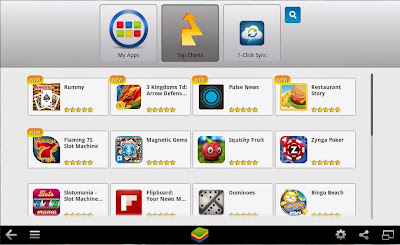
  • Run the player from the desktop icon. You’ll get to a screen similar to the one shown below
BlueStacks
  • Click on the Search icon and enter WhatsApp
  • Select WhatsApp Messenger from the list and proceed to the installation. It might also ask you for a Google account, just provide that right away. Since it is an Android emulator, you’ll be navigated to Google Play. Click Install and it’ll start the download.
Download WhatsApp
  • And that’s it! WhatsApp will ask you to enter a valid phone number. The verification will also work through that number so you better enter it correctly.
  • Great! Now you can use WhatsApp the way you do it on a smartphone. You can customize your profile, contact all your friends regardless of which platform they are running the app on and also get live notifications of new messages from the emulator.
Use WhatsApp!

You can open up the app form the My Apps category in the main screen.

So why WhatsApp?

There are several other such messenger services available on the same platforms. You have Viber, Wechat, Kik and whatnot. Firstly, WhatsApp is the most popular app of the lot. Secondly, WhatsApp has got everything - you can communicate text, images or even high quality videos with friends. Plus, it’s simple and easy to use. And if your one-year free license expires, you can always reinstall the app to get it back.
WhatsApp is not officially released for PC/Mac but there are ways like the one mentioned above that make that happen. The methodology is simple but works quite well. WhatsApp is also the best of its kind which makes it a must-have. Just in case you were wondering throughout this tutorial, YES you can run any android app/game on the software mentioned. Guess your life just got better, much better!

Got any questions? Feel free to shoot 'em in the comments section below. Cheers :)

0 6 Most Common Password Cracking Methods And Their Countermeasures

6 method used to crack passwords
There are number of methods out their used by hackers to hack your account or get your personal information. Today in this post i will share with you guys 6 Most commonly used method to crack password and their countermeasures. You must check out this article to be safe and to prevent your online accounts from hacking.

1. BruteForce Attack

brute force attack
Any password can be cracked using Brute-force attack. Brute-force attacks try every possible combinations of numbers, letters and special characters until the right password is match. Brute-force attacks can take very long time depending upon the complexity of the password. The cracking time is determined by the speed of computer and complexity of the password.

Countermeasure: Use long and complex passwords. Try to use combination of upper and lowercase letters along with numbers. Brute-force attack will take hundreds or even thousands of years to crack such complex and long passwords.
Example: Passwords like "iloveu" or "password" can be cracked easily whereas computer will take years to crack passwords like "aN34lL00"


2. Social Engineering

Social engineering is process of manipulating someone to trust you and get information from them. For example, if the hacker was trying to get the password of a co-workers or friends computer, he could call him pretending to be from the IT department and simply ask for his login details. Sometime hackers call the victim pretending to be from bank and ask for their credit cards details. Social Engineering can be used to get someone password, to get bank credentials or any personal information.

Countermeasure: If someone tries to get your personal or bank details ask them few questions. Make sure the person calling you is legit. Never ever give your credit card details on phone.

3. Rats And Keyloggers

keylogger
In keylogging or RATing the hacker sends keylogger or rat to the victim. This allows hacker to monitor every thing victim do on his computer. Every keystroke is logged including passwords. Moreever hacker can even control the victims computer.

Countermeasure: Never login to your bank account from cyber cafe or someone else computer. If its important use on-screen or virtual keyboard while tying the login. Use latest anti-virus software and keep them updated. Check out below article to know more about Rats and Keyloggers.

4. Phishing

phishing hacking
Phishing is the most easiest and popular hacking method used by hackers to get someone account details. In Phishing attack hacker send fake page of real website like facebook, gmail to victim. When someone login through that fake page his details is send to the hacker. This fake pages can be easily created and hosted on free web-hosting sites.

Countermeasure: Phishing attacks are very easy to avoid. The url of this phishing pages are different from the real one. For example URL of phishing page of facebook might look like facbbook.com (As you can see There are two "b"). Always make sure that websites url is correct. Check out below article to know more about phishing.

5. Rainbow Table

A Rainbow table is a huge pre-computed list of hashes for every possible combination of characters. A password hash is a password that has gone through a mathematical algorithm such as md5 and is transformed into something which is not recognizable. A hash is a one way encryption so once a password is hashed there is no way to get the original string from the hashed string. A very commonly used hashing algorithm to store passwords in website databases is MD5. It is almost similar to dictionary attack, the only difference is, in rainbow tables attack hashed characters are used as passwords whereas in dictionary attack normal characters are used as passwords. 

Example: ‘hello’ in md5 is 5d41402abc4b2a76b9719d911017c592 and zero length string ("") is d41d8cd98f00b204e9800998ecf8427e

Countermeasure: Make sure you choose password that is long and complex. Creating tables for long and complex password takes a very long time and a lot of resources

6. Guessing

password guessing
This seems silly but this can easily help you to get someones password within seconds. If hacker knows you, he can use information he knows about you to guess your password. Hacker can also use combination of Social Engineering and Guessing to acquire your password.

Countermeasure: Don't use your name, surname, phone number or birthdate as your password. Try to avoid creating password that relates to you. Create complex and long password with combination of letters and numbers.

0 How To Download APK Files Directly From Google Play?

Download APK Files
Usually, people get apps for their android device by downloading them from Google Play Store. The downloader gets the app installed for you, without bothering you with unnecessary details like the files required for installation etc. But what if you don’t have access to internet and you want an app installed on your phone? Surely you can’t do so without downloading stuff required for the installation. The solution to this problem is simple - just get the APK package of the desired app, and keep it beforehand for later when you need.
APK stands for Android Package. It’s actually a package which contains all the files necessary for installation. In other words, it’s a ‘standalone’ installer for your app which doesn’t require internet connectivity. You can get APK package of an android application from Google Play Store by simply adding an extension called ‘APK Downloader’ to your Google browser. Here we have a step by step procedure which will tell you how to add APK Downloader to your Google Chrome and subsequently, use it for getting APK packages
Once downloaded, the extension is to be added to your Google Chrome Extensions. To do so, follow these steps.
  • Go to the ‘Tools’ menu of your Chrome and select ‘Extensions’.
  • Locate the file you just downloaded (with extension ‘.crx’)
  • Now drag the file to your Extensions page.
  • For confirmation look for a small Play Store icon on your address bar
To configure the APK Downloader extension for your android device
  • Select the ‘options’ button on the menu
  • Enter the Gmail ID (the one required for Play Store)
  • Enter your password and device ID of your android device

For those of you who don’t know where to get device ID of your android device
  • Dial  “*#*#8255#*#*” from your android phone
If you are using an android tablet
  • Go to Google Play Store
  • Download ‘Device ID’
Device ID

Device ID will get your device ID for you.

Getting APK of an app is simple, just locate the app you want (on Play Store) and clicking on the APK icon on your address bar will get you your precious APK for that app. Another good thing about APK package is that it makes app sharing simple, now you can share an app with your friends by simply transferring the package to their device.

APK Icon

The APK and APK Downloader will make your life a lot easier if you face problems in installing your favorite apps due to connectivity issues or if you like to share your favorite apps with your friends.

Did you find this post useful? Did you have any problems? For any query, please ask in the comments section below. Cheers :)

0 How to Change Your Logon and Boot Screen in Windows XP

Start changing your windows xp Logon  and boot screen perfectly by yourself.You can change your XP logon and boot scree with logon loader and bootskin software.You can also change your logon background without  using  any software.Now I share how you change your  XP logon and boot screen with software.This so easy to change your screen with software.Follow the following commands to change your windows logon and boot screen :.. 

First of all click here and then and download it and then install it.
Now click here to download the "Logon loader" software to change your XP logon screen.

Now install it then go to www.deviantart.com

Now search there "windows XP logon" .
Now download one by your choice.
Now open your "logon loader " software and click on"select a logon screen "
Now select your logon which you dowload from www.deviantart.com


It will like this.And show the preview.

Now restart your computer and see your logon screen is changed.

#Now for changing your boot screen follow the following command :..
First of all click here to download "bootskin" software.
Now install it.
Now select anyone logon for your for your boot screen.
And click there apply.You can also see the preview of the boot screen.Ii wiil like this one.
Enjoy it from now.

Saturday, 30 November 2013

0 How to use two WhatsApp accounts on Android phone ?

WhatsApp 150x150 How to use two WhatsApp accounts on Android phone? WhatsApp is a most popular application which allows you to communicate with your friends & family, share pictures, videos and voice notes totally free using data network access. WhatsApp is simple & easy application that works on almost every Operating System like Androids, Window phones, blackberry and IOS very smoothly. WhatsApp is now a part of everybody’s life. WhatsApp had 200+ million monthly active users and recently the app made a new record of 27 billion messages per day.
Now coming to the topic, all of us wants to use two Whatsapp account on our phone for many reasons, today I am going to share a way to use two WhatsApp accounts on your Android phone. If you have dual SIM android mobile phone, you might be willing to enjoy two Whatsapp accounts on your Android  device for two different SIM numbers.

How to use two Whatsapp Accounts on your Android phone – Procedure

Requirements for use two whatsapp accounts:

1)       First of all you need  a rooted Android Device (phone).
2)       After that download SwitchMe multiple accounts app from your android phone app store and install the app.
for download switchme app Click Here, SwitchMe app allows you  to work in multiple user spaces with each different account has             its own settings like login data, apps and all other setings.
swithme 150x150 How to use two WhatsApp accounts on Android phone?
3)       Then download whatsapp in you android phone from app store and install it.
For downloading whatsapp Click Here
WhatsApp 150x150 How to use two WhatsApp accounts on Android phone?
4)       Make sure your phone had enough memory space on phone memory or on SD card

After completing the above process follow these steps to use two whatsapp accounts

1)       Run SwitchMe app on your rooted android device (phone)
2)       Create two different user profiles in SwitchMe app for running two different whatsapp accounts.
3)       The first profile you created in SwitchMe will work as administrator profile.
4)       Now open SwitchMe app and active first profile and download whatsapp from your app store and install it and register your account.
5)       After activating first whatsapp account, go to SwitchMe app and active second profile and again download whatsapp account for a second account and register your second account on it .
Congratulations!!! Now you are successfully running two Whatsapp account on Android Device (phone). Enjoy!!!

Note: Please Do this at your own risk. The developer is not responsible if anything happens to your Android phone as running rooted Android apps is always subjected to risk factors. Although this trick worked on my Htc Desire X successfully. Don’t forget to take backup of your phone in case anything goes wrong.

0 Remove Windows Password Windows 7 & Vista

Remove Windows Password: Windows 7 & Vista:
Click Start,
type netplwiz,
and press ENTER. -
See Next
Windows XP:
Click Start>Run,
 type control userpasswords2,
and press ENTER. -
End

0 How to make you computer run Super Fast ?

Remove Useless software and apps :
We often install many unnecessary application and later forget to uninstall them These application becomes burden in our computer and eventually slow down our computers So at first you need to delete all this unnecessary application and software To uninstall the software you should go to Control Panel->Add or remove->find and select the software you would like to uninstall.

Clear your Prefetch folder:
Windows saves a file of the program you are using to make it start up faster. After years of use, this folder gets stuffed with irrelevant programs.
>>>Open Notepad and type:
del C:\Windows\Prefetch\*.* /Q
Rundll32.exe advapi32.dll,ProcessIdleTasks (Copy and paste this text to ensure you don’t make any mistakes.)
>>>Save as faster.bat (the .bat extension will run it as a batch file).
>>>Run it! Simply double-click the file to initialize. In a few moments, the command prompt will disappear and your programs should run more smoothly.

Utilize your RAM performance :
A lot of you may have these setting already set. But If you don’t have then don’t worry. You just have to follow the process. Right click on My computer->Properties->Advanced system settings->Setting(Under Performance)->Advanced->Change(Under Virtual Memory). Now double the number in Maximum size then the number initial size. It will surely help your PC to utilize the most of RAM.

Turn off indexing:
Go to My Computer, right-click the Hard Drive and select Properties, then unclick the box indicating that the drive should be indexed. Don't do this if you actually use any of the Windows Search functionality. The background indexing is what makes those searches fast and Windows is already very good about not getting in your way to do indexing while you're trying to do something else.

Desktop-cleaning :
We often keep unnecessary file in our desktop but it actually affects the performance of our computer. Delete the useless files or another choice is to move them to Local disk if necessary. You should only keep shortcuts in your Desktop only if you needed. If we keep Wallpapers on our desktop it also effect slightly to slow down our computer a blank screen is always better remove temporary internet files and cache from your web browser Browsing internet slow down our computer You need to clean these temporary files and cookies to make your computer stay clean and faster. There are a no. of software available today in the market which can do the task for you. You can use Ccleaner for this purpose which is a very trusted software.

Disk De-fragmentation :
We should defragment our disk to make our PC faster. For defragmentation process, just follow the same steps given below. Locate Hard disk C then click properties then click tools and then click defragment Now from the option Disk defragmentation.

Use a Trusted antivirus :
The last but not the least tip is to use a reliable trusted antivirus which will protect your PC from harmful antivirus. Bit defender, Kaspersky and AVG are some of the trusted antivirus but you have to pay to use them. If you don’t wish to pay some money then you can also download free Microsoft security essential to save your computer from harmful Malware and spywares.

Run a Disk Cleanup:
This can clean up hundreds of megabytes of temporary files – sometimes even gigabytes (if you have Windows XP, Vista, or 7). It will also open a window in which you can chose what to delete. Go to My Computer, right-click the Hard Drive and select Properties, and then click Disc Cleanup (within the General tab). Check all the boxes except for the game files and setup files.

Check for any disk errors:
These will also slow your computer down. Go to My Computer, right-click the Hard Drive and select Properties, then go to the Tools tab and click Check Now under the Error-Checking area. When the dialogue box opens, check both boxes.
If you get a window saying that Windows can't check the disk while it's in use, click on Schedule Disk Check and then OK. It will run on your next reboot.

0 Make Bootable USB Pen Drive For 3 in 1 Windows

Make Bootable USB Pen Drive For Windows
Windows XP,Windows 7,And Windows 8
In this post, I will show you how to load the Windows installation in your USB flash drive and how to make it bootable just like the DVD from your .iso image

This Post Very Help Full Guy's Because Install Window With USB Is Many Time Faster Than DVD.

Every needed software inside this pack no need to download more software

Info:
Download this software
after download extract etc. files
and install software.
Enjoy

Download For Windows


Windows XP
Windows 7
Windows 8

Share this post on your Facebook Profile,Twitter and Google.

Thank you

0 Kaspersky Internet Security 2013 working keys

First Download this Download
1. Open Kaspersky 2012 or 2013 License Manager (from lower right corner).

2. Click ‘Activate the application with a new license’ button. (Delete any trial key first, by clicking the red X next to the key).

3. Select ‘Activate commercial version’ and enter the activation license code as 11111-11111-11111-1111X

4. Wait activation wizard message->Click OK

5. Wait for wrong activation code message->Click OK->

6. Screen will appear with KEY FILE BROWSE

7. Browse to the key location and activate kaspersky.


Activate Kaspersky 2011 by Command Line Method
http://www.youtube.com/watch?v=KfWOQu1lL54

To Activate Kaspersky 2012 or 2013 license using key file:

1. Open Kaspersky 2011 License Manager (from lower right corner).
2. Click ‘Activate the application with a new license’ button. (Delete any trial key first, by clicking the red X next to the key).
3. Disable your internet connection (either disable Network adapter from control panel or turn off your modem/router).
4. Select ‘Activate commercial version’ and enter the activation license code as  T1JVS-NNMBD-K1QTN-SUBP8
  or select ‘Activate trial license’.
5. Click Next, an error dialog box will open as shown below:
6. Click Ok and you will now get the option to activate kaspersky using a key file.
7. Browse to the key location and activate kaspersky.


To activate your kaspersky 2010 with key file-

1. Disable/Unplug your internet connection.
2. Click for trial version or enter one of this invalid codes-

GT5VQ-JX3MF-5SEFR-PX56F
5DS6N-FTMZV-HXUDK-H1XAR
51MNK-G3KW3-KHCZZ-8CN2M
HMSJA-5MX27-FM3VB-3252E
BBH1J-BMH1Z-JUWAD-52Y1V
H75P6-843Q4-N99RQ-7TRKG
K7BXW-1BHGB-AVKHG-F162Q
J398A-DR1YN-AG7KC-F2Q5J
GT5VQ-JX3MF-5SEFR-PX56F
KJEGM-C7274-1G5SN-TSAP3
HXGN1-YBCXH-J3KW9-K589V
KK9WC-GGMC7-XCYVF-1R8XU
H7FUH-KM6TN-S5UTX-93QBS
JTCSR-3X2RX-KVRBC-N462M
H979W-ANDMZ-N4W1K-Z3RS4
7C72Z-GYXM2-G2D95-RY8CV
HCW7U-C34VH-ETTWU-YPUGD
FNQT5-1YD9E-MJYY8-WXEX8
KK98K-HHXWG-C3JG6-6ZZYR
HYRPZ-38W2X-MB5DH-KF421
J5CPD-63M7R-KBR9E-H6YHB
B4862-EGQ3Q-J3GNU-EDECD
J5Z1H-NHR8J-9HZFA-DJ5FT
3TZV1-Z5F9W-DXBWX-Q1KDA

3. Kaspersky will show you an error.
4. A new window will appear with key file browsing option.
5. Select your key from browsing window.